

«Back in April 2025, in my End of the App Store? essay, I speculated about a future where a single AI-powered “super app” would replace all the apps. Models and agents have improved a lot since then at tool use and code generation, turning that “super app” concept into a clear and present capability whereby user interfaces can be generated on the fly to address a user’s need. This article is my February 2026 update, backed by a demo from a weekend project.»
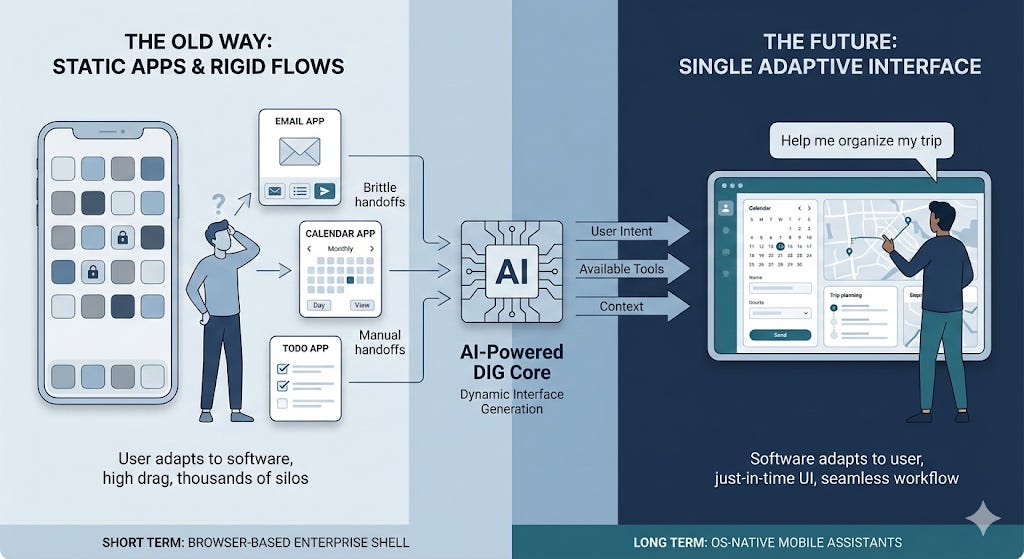
The key takeaways up front (sort of like a very long TL;DR)
The static app model has worked for decades, but it forces every user to learn how to navigate many apps, each with its own fixed set of predetermined screens. The apps in turn need armies of product managers, business analysts, architects, developers, testers, and SREs to build and maintain them.
In this article, I propose that AI-powered Dynamic Interface Generation (DIG) exchanges rigid consistency, long build times, and high build costs for high flexibility, lower predictability, just-in-time builds, and higher runtime costs. The LLM generates exactly the interface the moment requires. No more, no less.
The range of tasks where a generated interface is good enough is growing as models improve. Functions like task tracking, workflows, email triage, calendar management, and integration of different UI components such as maps, tables, charts, and data dashboards are all within reach today. Stateful, high-frequency workflows and complex functionality will likely need a purpose-built UI for a while. And the backend services that implement core business logic will remain (of course, AI coding agents will be used to generate them as well!).
Given these rapidly increasing capabilities, this is the future I envision for phones, laptops/desktops, and enterprises:
On phones, you stop hopping between apps and instead ask a smart assistant for outcomes, and it dynamically assembles UI and flow to achieve that outcome for you.
On laptops/desktops, there’s more room for specialized tools but the main interface for many users will likely be a single adaptive workspace that pulls the right panes and actions across email, docs, tickets, dashboards, and more.
In enterprises, multiple front-end apps converge into one governed interface sitting above many systems and services, making most internal CRUD and workflows generated, and pushing SaaS value downward from vendor screens toward APIs offering high-value capabilities.
In the short to medium term, browsers are a natural choice for implementing DIG for enterprises because of their secure-by-default runtimes, the JS/HTML/CSS combination that lends itself to dynamic interface generation, and centralized deployment capability. On the other hand, mobile operating systems will likely develop OS-native DIG capabilities for tighter device integration and lower latency.
All leading LLMs already exhibit some dynamic interface generation capabilities (when they generate deep research artefacts, for example). Google’s experimental browser, Disco, also takes a stab at this with its gentabs functionality. But it’s not quite what I thought would illustrate the vision I had in mind. So, I built a prototype to show how the dynamic interface generation loop might work. You can watch the video here:
For those of you who are interested in reading through, here we go…
1. Introduction
We are so used to doing things a certain way that we assume it is the only sensible way to get things done. But every so often, a real shift in technology lets us question our most basic assumptions. The idea that we need a separate app for each kind of use, with a bunch of prebuilt screens and rigid flows, is something we’ve all come to expect. But it doesn’t have to be that way!
Many of us literally have hundreds of apps, each created for its own special use. Wouldn’t it be nice if your “smart” phone was actually smart, and gave you a single place to start, whether that is a screen or voice, and then quietly invoked whatever functions and services were needed to get stuff done?
The same problem shows up even more clearly in enterprises. Every corporate worker needs to learn dozens of applications to do their job. Sure, there are massive systems like ERP software that try to pull it all together. But customizing these systems is a gargantuan task, and the result is often a complex jumble of screens that reflects what was feasible to build, and users still have to learn how to go through them to get their job done. Wouldn’t it be better to have a single screen that adapts itself to the job you are trying to do? It might still interact with dozens of systems using all kinds of APIs behind the scenes, but you would not have to care.
That’s what I think is possible with LLM powered Dynamic Interface Generation (DIG). In the rest of this essay, I’ll talk about the pain points faced by today’s app-centric model and static user interfaces, make the case for DIG, share a video of an app that I created to demonstrate the art of the possible, and conclude with current limitations and why I believe many of them are likely to be overcome within the next few years.
2. The Problem with Thousands of Apps and Static User Interfaces
Almost every UI we use today was designed by a team that guessed what screens we’d need. They built navigation hierarchies, screen layouts, and interaction patterns long before we ever opened the app. When our needs don’t fit their assumptions, we submit a feature request (if we can) and hope it gets fixed in the next version.
These feature requests go into backlogs. Product teams prioritize based on aggregate demand. The interface we actually want, a specific combination of data, layout, and actions, may never ship because it’s too niche to justify engineering time.
The result is a world of rigid, prebuilt interfaces that users learn to navigate. Instead of software adapting to them, they adapt to software.
Thousands of special purpose apps also create very concrete operational drag. Users lose time context switching as they move between tools. Work gets stuck in the seams between apps (copy-paste!) and brittle handoffs that rely on people remembering “the next step.”
3. What Dynamic Interface Generation Changes
DIG replaces the static design-build-deploy model with a fundamentally different approach. The user describes what they want to accomplish, and an LLM generates the interface on demand, connected to real data, capable of real actions to support the user’s intent.
It also changes how “UI requirements” work, pushing them into runtime via the intent expressed in the user’s prompt. The “requirement” becomes “help me accomplish X,” and the system is free to render the best UI it can for the moment, given the tools and the data available. That is a different way of building software, and it shifts effort away from endless UI iterations.
There will be fewer and fewer apps with prebuilt screens. No navigation menus and screens designed by committee. The LLM is provided with a list of tools and services, and it decides which tools to invoke, what data to fetch, what interactions to offer, and how to render the user interface. The things steering it are the user’s intent, the state provided in context, and what it knows of the user’s preferences and history.
4. The Opportunities
Smartphones
We will see a gradual transition toward phones where the primary interface is no longer a grid of apps. The OS comes with one “smart” app, and “apps” become API based service providers. For example, in the case of the iPhone, Siri will not just be a voice assistant you occasionally invoke. We will move toward a future where Siri is the main interface you use to get things done. I know, I know. Siri gets a lot of flak, and deservedly so. But I’m talking about a future where Siri is powered by an AI that actually works.
There might remain some special cases where precise control and efficiency of a static UI would be needed, but for the vast majority of cases an LLM generated dynamic UI is likely to be the better choice (especially with LLMs specially trained with UI generation in mind). Consumer devices will likely push more of the DIG experience into OS-native implementations for tighter integration with device capabilities and better latency.
Laptops and Desktops
Laptops and desktops are where DIG can get interesting because the surface area for work is larger, and some specialist interfaces like the unix terminal are likely to remain in use for a while. But most casual users will likely work inside a single adaptive workspace that generates the right mix of panes: email, calendar, documents, spreadsheets, and chat.
The Enterprise
Similar to the mobile and desktop experience, there will be a convergence toward a single interface that sits on top of a complex web of AI agents and traditional deterministic services. And the UI layer orchestrates them based on the user’s intent.
A huge amount of enterprise software consists of CRUD screens, workflow enabling screens (approvals, routing, etc.), reconciliation views, status dashboards etc. And these are ripe for replacement by a single dynamically generated interface.
Modern web browsers have intrinsic advantages that make them a strong starting point for DIG as a universal integration shell in enterprises. They provide mature isolation and security primitives, and the HTML/CSS/JS stack is a powerful, widely supported substrate for dynamic rendering.
SaaS might still matter because the cost of building and operating a complex business domain can be shared among many customers, but the vendors’ primary interface becomes less defensible. It’s likely to become an API and capability layer, while the UI becomes generated and owned by the enterprise rather than by each vendor.
This also reframes build-vs-buy more broadly. Enterprises will still buy capabilities, but end up with one adaptive interface that can unify workflows across many systems, while integrating with corporate data, and enforcing consistent governance and permissioning.
5. So, what changes?
Every user gets a tailored experience
Two users asking “show me my schedule” might get completely different layouts depending on how many events they have, what data is available, and how they phrased the request. There is no single “calendar view” that has to work for everyone. The LLM tailors every render to the specific context.
The long tail of internal tools disappears
Enterprises maintain hundreds or thousands of internal dashboards, admin panels, and CRUD interfaces, each with its own deployment pipeline, bug backlog, and maintenance burden. Most of these are simple combinations of data fetching and form submission. A DIG system replaces them with a single deployment that generates each interface on demand. The integration surface shrinks to a set of tool definitions and API credentials.
Product iteration method changes substantially
The traditional cycle (design a screen, ship it, measure engagement, redesign) takes weeks or months. With DIG, this cycle is broken, and traditional methods like A/B testing become a lot less relevant as every interaction is a unique rendering. We’ll need to find new ways to evaluate the effectiveness of the screens generated, and how to feed what we’ve learned back into the next version of the agent or the LLM.
6. What Doesn’t Work Yet
Many of the limitations described below can (and will) be addressed as models are trained with more examples of DIG (how to build better interfaces dynamically to meet user intent while using context, data, and available tools and services effectively).
Consistency. The same prompt produces different layouts on different runs. For workflows where muscle memory matters, this could be a real problem. The system needs layout pinning, preference learning, and perhaps “UI contracts” for certain workflows.
Latency. Generating a UI render takes many seconds compared to the milliseconds taken by traditional prebuilt screens. Caching common patterns and using partial renders would help, but we will likely rely on special purpose SLMs or on LLM performance improved further as it’s been over the past few years.
Complexity ceiling. Leading LLMs can generate most of the UI functionality dynamically. But, there is a threshold beyond which it needs to rely on prebuilt software (e.g., a spreadsheet component). But, LLMs can be trained to embed and use prebuilt components where needed.
Cost. Every interaction is an LLM call. At current token pricing, a power user using a DIG based app all day will accumulate significant API costs. This will improve as inference gets cheaper, but it’s a real constraint today.
Security. This isn’t a new issue with DIG per se, but I wanted to mention it here before someone calls me out on this :) The traditional security best practices will still matter. Backend services will still need to authenticate requestors, check if they have the right permissions, validate all input coming from the UI, and enforce all business rules, etc.
7. Conclusion
The static app model is optimized for a world where UI is expensive to build and where the safest way to ship software is to freeze screens into predictable, testable flows. But this world is changing.
With DIG, we give up some predictability in exchange for a UI that can match intent, context, and workflow in real time. But the “good enough” frontier is expanding fast. As models and the agentic solutions around them improve, the number of tasks that can be handled by generated interfaces will keep expanding. If that happens, single-purpose apps will reduce in number, and more of what we think of as “apps” will collapse into services and tools behind generated interfaces.