
When you interact with ChatGPT, Claude, or Gemini, it may feel like a simple exchange with a single model. In reality, you’re interacting with a large distributed system whose complexity has been growing dramatically as the leading LLM providers continue to add new capabilities to their offerings.
Between the prompt (which can be multimodal with text, voice, images, and video) you enter and what you see in response sits a layered architecture of user interfaces, routers, orchestrators, memory stores, specialized models, tools, agents, code executors and content renderers. These systems have evolved from basic chatbots into modular platforms where choices about context, privacy, latency, and cost are made continuously and automatically. Understanding how the pieces fit together makes you a better user.
For developers and architects, this understanding explains why the same LLM apps can behave differently on different machines/users. The set of available tools, their configurations, the memory retrieved and embedded in the context, the routing, pre/post processing choices would ultimately determine the outcomes. It also shows them where to look for when trouble shooting or when looking to design an innovative agentic solution.
The diagram below shows one way in which such a system could be designed, followed by a description of each of the numbered parts. The actual implementation details would vary from provider to provider, of course.
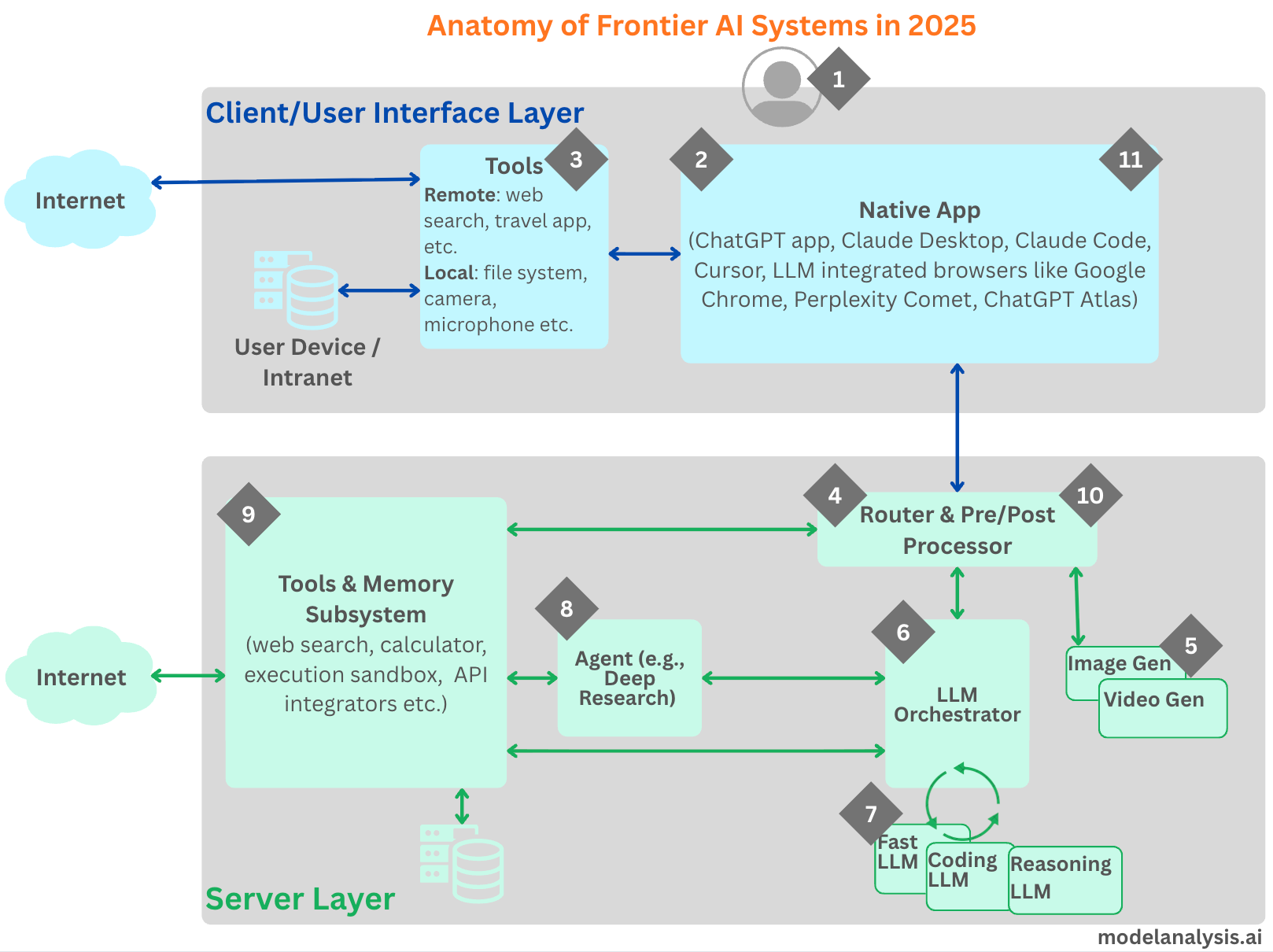
1. The User
Every session starts with the user’s intent. You enter text, speak a command, or attach a file, and that input becomes the first step in a long pipeline. Even at this starting point, the system makes decisions on your behalf: which hidden instructions to include, what metadata to attach, and whether to collect additional local context such as timezone or project settings. Those invisible choices shape how the downstream components interpret your request and decide what to do next.
2. The Native App
The front-end is no longer a thin veneer that just supports text-in and text-out. Instead, today’s clients play an active role in capturing the intent, managing local state, and integrating with your device. A desktop assistant can listen for a wake word, read files you’ve explicitly shared, or summarize notifications. An IDE assistant can index repositories and extract build errors to included in the context. A browser client can extract useful context from the web page along with the user’s prompt to pass on to the server.
3. Client-Side Tools
Client-side tools ground the system in your environment. With your permission, the Native App may use your mic as input, scan selected documents, assemble a code context from your workspace, or even use MCP to make calls to external services (e.g., shopping carts, travel argents, calendars). Many clients parse chosen files, embed their contents, and even build an index for fast search and retrieval so that when you ask a question, the relevant snippets can be included in the prompt sent to the server. Done well, this creates personalization without overflowing the context. Sensitive material should stay on-device unless you explicitly opt in, and the client should only be sending the minimum information required to answer your question accurately.
4. Router & Pre-Processor
Once the request leaves the device, a server-side router becomes the air traffic controller. It classifies intent, inspects metadata, applies safety and normalization, and selects the appropriate path: language model, coding model, image generator, video generator or an agent (e.g., Deep Research). The router also enriches your input with server-side context (conversation summaries, long-term memory, or provider policies/guard-rails) and templates along with the prompt.
Apart from providing access to different models providing a rich and diverse set of functionality, this routing capability allows the LLM provider to save money by running simple(r) queries on smaller/faster LLMs.
5. Image/Video Generation
If the user’s request needs generating images or video, the orchestrator invokes a generative model (distinct from LLMs) specialized for this purpose.
6. LLM Orchestrator
The Orchestrator calls the LLMs as identified by the Router. It may end up calling just one LLM, or a sequence of them (e.g., start with a smaller, fast model to parse tasks and draft a plan, escalate to a larger reasoning model for multi-step logic, and switch to a code-tuned model to generate or execute programs). Intermediate results are stitched together, cached where useful, and reintroduced into the context for subsequent steps. If the intermediate responses from the LLMs include a request to make a tool call on the server-side, the orchestrator makes those tool calls, adds the resulting content to the context and submits them back to the LLM for processing. See section 9 for more details.
7. LLMs
This is very simple really, a given LLM takes the context submitted by the Orchestrator as input and provides its response (one token at a time).
8. Agent Layer
For complex workflows, an agent such as Deep Research may sit between the orchestrator and tools. The agent is responsible for executing the “agentic” loop by leveraging all the tools and a suitable LLM.
9. Tools including Memory System & Execution Environment
In order to respond to the user’s prompt, the LLM might choose to make a tool call. The Orchestrator interprets these calls, executes the tool calls and returns the results to the LLM. Web search grounds answers in fresh information. A calculator guarantees numerical precision. A code runner executes snippets and returns outputs. API connectors let the system perform external actions such as querying a travel database, reading a calendar, or placing an order on a popular shopping site. Each tool’s output is appended to the context and the model continues, forming a tight loop of “plan → act → observe → refine.”
Because base models are stateless and context-limited, the system relies on memory to provide continuity. Short-term memory supplies the immediate chat history. Long-term memory retrieves relevant facts from historical chats and any additional documents and artefacts (e.g., supplied as part of a project conversation). The orchestrator then augments the current prompt with only those pieces of information required for the task at hand. The result is an experience that can pick up threads from prior conversations or recall user preferences.
10) Post-Processor
The text that streams back to you is rarely the raw model output. A post-processor formats the response and applies safety checks. It may redact sensitive material, downgrade uncertain claims, or request another pass from the model with tighter constraints.
11) Response Delivery and Feedback
The response returns through the client, which can take local actions by invoking tools such as saving a file, updating a dashboard, or reading the output aloud. From your perspective, this might like a single conversation but under the hood, it’s a carefully managed pipeline balancing speed, accuracy, privacy, and price.
In conclusion, when using LLMs from leading providers, we don’t interact directly with a model but with complex systems built around models. The LLM remains the centerpiece, but it is part of a broader operating stack where memory and tools define the experience as much as the LLM does.
Very informative.